Archive for the ‘Multimedia Tools’ Category


E.M. Total Video Converter 3.50

total-video-converter


E.M. Total Video Converter is a piece of extremely powerful and full-featured converter software that supports almost all video and audio formats. The software is designed to convert video for your mobile video player as 3gp, mp4, PSP, PS3, iPod, iPhone etc and also VCD or DVD player, XBOX360.

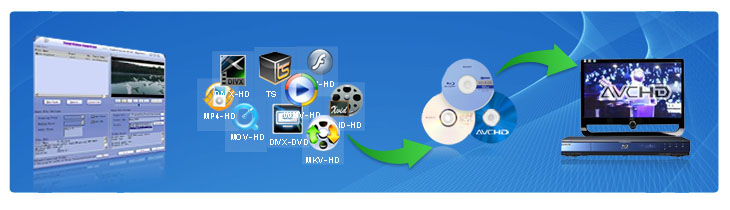
New Total Video Converter 3.50 let you experience Unparalleled High-Definition movie. It is the best and unique software today with incomparable support for converting and burning video to AVCHD disc which can work on PS3 and Blu-ray player. Meanwhile, it supports for converting and burning video to HD formats like H.264 TS, Mpeg-2 TS, WMV-HD, MKV-HD, DivX-HD, Divx-HD, MOV-HD, FLV-HD and MP4-HD.

E.M. Total Video Converter 3.50 New Features:

1 Convert and burn video to AVCHD which can work on PS3 and Blu-ray player. What’s more, the HD videos of AVCHD (*.mts, *.m2ts, *.ts) can been converted to any other video formats.
2 Convert video to HD formats like H.264 TS, Mpeg-2 TS, WMV-HD, MKV-HD, DivX-HD, Xvid-HD, MOV-HD, FLA-HD and MP4-HD
3 Convert and burn WMV-HD video to DVD. Meanwhile, it can work on XBOX360.
4 Convert and burn common video to DivX-DVD. More importantly, it can work on DVD player with DivX capability.
5 Integrate a free tool for capturing game video.

E.M. Total Video Converter V3.2 New Features:

1 Multi-language GUI.
2 Integrate a free tool for capturing desktop to any formats video.
3 Support mpeg, h264, wmv multi-thread decoding and endcoding for Multi-core CPU;
4 Support watermark through Plugin while making conversion;
5 Support VirtualDub video filter plugin;

Main Features of Total Video Converter:

* Convert all kinds of videos to mobile videos or audios (mp4, 3gp, xvid, divx mpeg4 avi, amr audio) which are used by cell-phone, PDA, PSP, iPod, iPhone, Xbox360, PS3 etc.;
* Photos slide show combines multi-photos and musics with more than 300 photos fantasy transition effect;
* High compatibility and high efficiency for Importing RMVB or RM video/audio;
* Convert various videos to MPEG videos compatible with standard DVD/SVCD/VCD;
* Burn the converted videos to DVD/SVCD/VCD;
* Rip DVD to popular videos of all sorts;
* Extract audio from various of videos and convert which to all kinds of audios (mp3, ac3, ogg, wav, aac);
* RIP CD to audios of all sorts directly;
* Support using with command line;
* Combine several video and audio files to one video file;
* Demultiplex or extract video and audio;
* Multiplex video and audio to one file;

Flv Nelly Mosser audio extract and decode.


  • Share/Bookmark

Posted by mightz on September 15th, 2009 No Comments

FreeZ Online TV


freez-online-tv


Watch over 500+ Internet Channels on you PC!

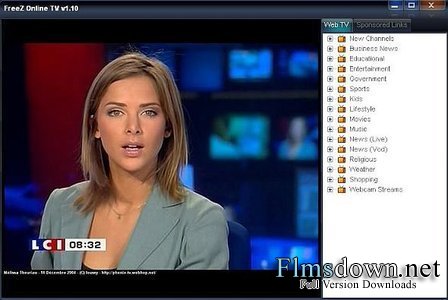
FreeZ Online TV program that can receive over 500+ free online channels of daily and live broadcasts from around the world. There is no need for a PC TV card because the TV channels are streamed through your Internet connection.

It allows watcher to watch directly into TV. You can watch in regular or full-screen mode. This software comes with automatic TV station updates so it will never be out of date. Watch TV online anywhere, anytime all from the comfort of your PC.


  • Share/Bookmark

Posted by mightz on August 19th, 2009 No Comments

Protected Music Converter 1.1


An easy to use software for protected music conversion

Protected Music Converter is a software which allows you easily convert your protected (or unprotected) music files to most frequently used unprotected formats (MP3, OGG, unprotected WMA).

Thus you can listen your music on your iPod, burn them to Audio CD, upload them on your cell phone, use them on whatever device you want, even if it doesn’t support protected content playback. Installation procedure is very fast and easy, it means no unsigned 3rd party drivers (causing Blue Screens Of Death here and there) installation, no weird sound system detection screens, just usual file copy procedure and that’s it.

Interface is straight and easy to use, all you need to do is to add your protected files to batch list, select desirable output format and press start button.

You can use one of standard profiles with settings for each output format, or create your own by pressing "Custom profile…" button.

You can add files to batch list one by one or scan folder for music files, Drag’n'Drop, Copy/Paste from MS Explorer support is also included.

Supported input formats are: WMA, M4P, MP4, AAC, MP3, WAV, OGG, AU audio files, AIFF.

Requirements:

· 32 Mb of free RAM
· Windows Media Player
· About 10Mb of free hard drive space

Limitations:

· 14-days trial


  • Share/Bookmark

Posted by mightz on July 7th, 2009 1 Comment

ConvertXtoDVD

x2d-box-lights 


VSO ConvertXtoDVD is an attractively designed and easy-to-use video burner that gives you the power to convert and burn a huge range of formats.

VSO ConvertXtoDVD can handle just about any format you throw at it including AVI, WMV, MKV, YouTube, OGM, MPEG and Quicktime. So instead of having to watch your downloaded films and videos on your PC, you can watch them in the comfort of your lounge on your DVD Player. VSO ConvertXtoDVD goes much further than just mere DVD creation though because it helps you create and author DVD menus. 

It offers the possibility to add background video, image or audio and even have chapter and audio/subtitle menus. If you do want to add subtitles, it supports most of the major formats including SRT, .SUB/ID and .SSA and VSO CovertXtoDVD gives you control over color and font selection, and supports tags like italic, bold and the ability to toggle them on or off with DVD player remote control. The encoder makes a decent job of converting videos in terms of the output quality although it is slightly slow – estimate about 1 hour for conversion of a full movie.

A powerful and easy way to get your favourite movies and video clips onto DVD and give them an extra touch of class with a menu.
Languages:

English, Spanish, German, French 
Recent changes in VSO ConvertXtoDVD:
Slowdown in Conversion speed resolved.
Error while converting some MKV Files fixed.
Limitations:

The trial version will integrate a watermark into the DVD
OS requirements for VSO ConvertXtoDVD:
OS: Win95/98/98SE/Me/2000/NT/XP/Vista


  • Share/Bookmark

Posted by mightz on July 3rd, 2009 No Comments

IVR Converter

IVR Converter is an easy to use and the most powerful ivr file converter software that is designed with two main functions.


1) convert ivr files to various video formats such as AVI, MPEG, WMV, DivX, MP4, H.264/AVC, RM, MOV, XviD, 3GP, FLV, SWF, DVD, etc.
2) convert ivr video to audio files such as MP3, WMA, WAV, RA, M4A, AAC, AC3, OGG, etc.
This IVR Converter is also an IVR format converter which will convert ivr to play on PMPs (portable media player) like iPod nano, iPod classic, iPod touch, iPhone, Apple TV, PSP, PS3, Xbox 360, Wii, Smart Phone like BlackBerry, MP3/MP4 players like Archos, Creative Zen, iRiver, Pocket PC, PDA, etc.

How to convert IVR files to AVI/MPEG/WMV/DivX/MP4/H.264/AVC/RM/MOV/XviD/3GP/FLV/SWF/DVD/etc.format with this wonderful IVR to AVI Converter? There are two major parts:

Part One: Burn your IVR files to VCD/DVD.

Step 1,
Free Download RealPlayer 11 and install it to your PC. If you already have Real Player 11 installed on your PC. Please ignore this step
Notice: RealPlayer is totally free for burning IVR to VCD. Burn to DVD is not free.


Step 2,
Find the Burn/Transfer Option on the top of RealPlayer.


Step 3,
Click Burn to DVD/VCD button to burn your convert ivr files to VCD.


Part Two: Rip the burnt VCD/DVD to AVI with IVR to AVI Converter
Step 4,
Free Download IVR to AVI Converter and install it onto your PC. 
Step 5, 
The burnt IVR file should be DAT format on your VCD disc. Try to load it into IVR to AVI Converter by click “ Browse “button. 
Step 6, 
Click the formats that you want convert, for example"to avi"button from IVR to AVI Converter control panel. 
Step 7, Click “convert now” button to start the conversion immediately. 
After the above click, your IVR file will be easily converted to AVI format diretctly. Now you can enjoy your online internet video recordings on your PC with Windows Media Player or anywhere very well with this powerful IVR to AVI Converter software.


  • Share/Bookmark

Posted by mightz on July 3rd, 2009 No Comments