Archive for the ‘Software’ Category


Internet Download Manager 5.18 Build 4

idm

info-1


Internet Download Manager (IDM) is a tool to increase
download speeds by up to 5 times, resume and schedule downloads. Comprehensive
error recovery and resume capability will restart broken or interrupted
downloads due to lost connections, network problems, computer shutdowns, or
unexpected power outages. Simple graphic user interface makes IDM user friendly
and easy to use.Internet Download Manager has a smart download logic
accelerator that features intelligent dynamic file segmentation and safe
multipart downloading technology to accelerate your downloads. Unlike other
download managers and accelerators Internet Download Manager segments
downloaded files dynamically during download process and reuses available
connections without additional connect and login stages to achieve best
acceleration performance.


Internet Download Manager supports proxy servers, ftp and
http protocols, firewalls, redirects, cookies, authorization, MP3 audio and
MPEG video content processing. IDM integrates seamlessly into Microsoft
Internet Explorer, Netscape, MSN Explorer, AOL, Opera, Mozilla, Mozilla
Firefox, Mozilla Firebird, Avant Browser, MyIE2, and all other popular browsers
to automatically handle your downloads. You can also drag and drop files, or
use Internet Download Manager from command line. Internet Download Manager can
dial your modem at the set time, download the files you want, then hang up or
even shut down your computer when it’s done.


  • Share/Bookmark

Posted by mightz on October 19th, 2009 No Comments

Internet Download Manager 5.18 Build 3


idm 


Internet Download Manager description

Schedule, resume and accelerate downloads by up to 5 times with this very good accelerator.

Internet Download Manager (IDM) is a tool to increase download speeds by up to 500 percent, resume and schedule downloads.

Comprehensive error recovery and resume capability will restart broken or interrupted downloads due to lost connections, network problems, computer shutdowns, or unexpected power outages. Simple graphic user interface makes IDM user friendly and easy to use.

Internet Download Manager has a smart download logic accelerator that features intelligent dynamic file segmentation and safe multipart downloading technology to accelerate your downloads.

During the download process Internet Download Manager segments downloaded files dynamically, unlike other download accelerators and managers that segment files before the download starts Internet Download Manager reuses available connections without additional connect and login stages to achieve better acceleration performance.

Internet Download Manager supports proxy servers, ftp and http protocols, firewalls, redirects, cookies, directories with authorization, MP3 audio and MPEG video content processing, and a large number of directory listing formats.

IDM integrates seamlessly into Microsoft Internet Explorer, Netscape, MSN Explorer, AOL, Opera, Mozilla, Mozilla Firefox, Mozilla Firebird, Avant Browser, MyIE2, and all other popular browsers to automatically handle your downloads.

You can also drag and drop files, or use Internet Download Manager from command line. Internet Download Manager can dial your modem at the set time, download the files you want, then hang up or even shut down your computer when it’s done.

Other features include multilingual support, zip preview, download categories, built-in download accelerator, scheduler pro, sounds on events, HTTPS support, queue processor, pipelining of ftp commands, html help and tutorial, enhanced virus protection on download completion, progressive downloading with quotas (useful for connections that use some kind of fair access policy or FAP like Direcway, Direct PC, Hughes, etc.), command line parameters, and many others.

Here are some key features of "Internet Download Manager":

· All popular browsers and applications are supported! Internet Download Manager supports all versions of popular browsers, and can be integrated into any 3rd party Internet applications.
· Download with one click. When you click on a download link in a browser, IDM will take over the download and accelerate it. IDM supports HTTP, FTP and HTTPS protocols.
· Download Speed. Internet Download Manager can accelerate downloads by up to 5 times due to its intelligent dynamic file segmentation technology.
· Download Resume. Internet Download Manager will resume unfinished download from the place where they left off.
· Simple installation wizard. Quick and easy installation program will make necessary settings for you, and check your connection at the end to ensure trouble free installation of Internet Download Manager
· Automatic Antivirus checking. Antivirus checking makes your downloads free from viruses and trojans.
· Advanced Browser Integration. When enabled, the feature can be used to catch any download from any application. None of download managers have this feature.
· Built-in Scheduler. Internet Download Manager can connect to the Internet at a set time, download the files you want, disconnect, or shut down your computer when it’s done.
· IDM supports many types of proxy servers. For example, IDM works with Microsoft ISA, and FTP proxy servers.
· IDM supports main authentication protocols: Basic, Negotiate, NTLM, and Keberos. Thus IDM can access many Internet and proxy servers using login name and password.
· Download All feature. IDM can add all downloads linked to the current page. It’s easy to download multiple files with this feature.
· Customizable Interface. You may choose the order, and what buttons and columns appear on the main IDM window.
· Download Categories. Internet Download Manager can be used to organize downloads automatically using defined download categories.
· Quick Update Feature. Quick update may check for new versions of IDM and update IDM once per week.
· Download limits. Progressive downloading with quotas feature. The feature is useful for connections that use some kind of fair access policy (or FAP) like Direcway, Direct PC, Hughes, etc.
· Drag and Drop. You may simply drag and drop links to IDM, and drag and drop complete files out of Internet Download Manager.
· IDM is multilingual. IDM is translated to Arabic, Bosnian, Bulgarian, Chinese, Croatian, Czech, Danish, Dutch, French, German, Hungarian, Italian, Japanese, Lithuanian, Macedonian, Polish, Portuguese, Romanian, Russian, Slovenian, Spanish, Thai languages.


  • Share/Bookmark

Posted by mightz on September 23rd, 2009 No Comments

Folder Lock 6.25

folder-lock-625


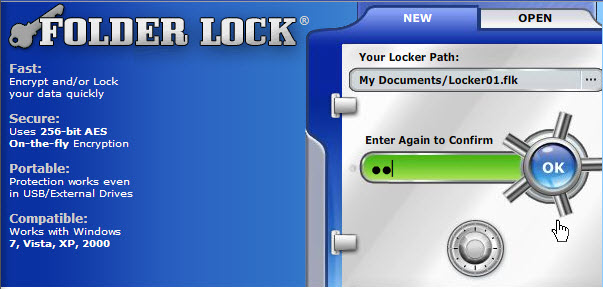
Folder Lock? is a fast data encryption and password protection software for Windows. It can simultaneously encrypt, lock and password protect your files, folders, drives, USB drives and even CD/DVD-RW.
Folder Lock creates encrypted storages called ‘Lockers’. You can keep as many of your private files & folders in your Locker and password protect it with a single click. You can transfer, secure and backup these Lockers. Lockers are portable, you can keep them in USB Flash Drives, CD/DVD (R-RW), & notebooks or transfer them via email or upload. Lockers are even undeletable on the computer where Folder Lock is installed.
You can treat Lockers just as you would treat them in physical world. Each user can have their own Lockers. However, a single user can create multiple Lockers with different passwords as well. With Folder Lock, you can choose either
to encrypt using 256-bit AES on-the-fly encryption or lock files, folders and drives anywhere on your computer. Each Locker can contain your encrypted files as well as your personal list of locked items.
Furthermore, Folder Lock’s options like hack attempt monitoring, stealth mode, data shredding, history cleaning & auto protection can enhance data security beyond anything ever achieved. In addition, a locker’s delete, move and rename are password protected to prevent data loss.
Folder Lock is Windows Vista / 2003 / XP / 2000 compatible and is the most downloaded File Security program in the market today.
Never give folder lock access to the internet because the program will check serial key with the server.


  • Share/Bookmark

Posted by mightz on September 17th, 2009 1 Comment

E.M. Total Video Converter 3.50

total-video-converter


E.M. Total Video Converter is a piece of extremely powerful and full-featured converter software that supports almost all video and audio formats. The software is designed to convert video for your mobile video player as 3gp, mp4, PSP, PS3, iPod, iPhone etc and also VCD or DVD player, XBOX360.

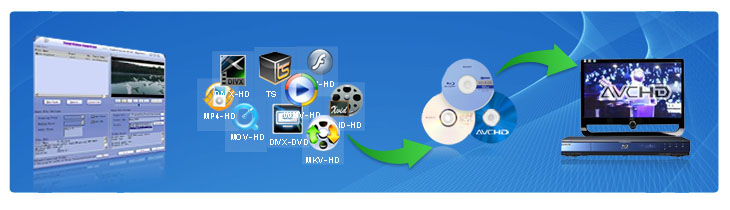
New Total Video Converter 3.50 let you experience Unparalleled High-Definition movie. It is the best and unique software today with incomparable support for converting and burning video to AVCHD disc which can work on PS3 and Blu-ray player. Meanwhile, it supports for converting and burning video to HD formats like H.264 TS, Mpeg-2 TS, WMV-HD, MKV-HD, DivX-HD, Divx-HD, MOV-HD, FLV-HD and MP4-HD.

E.M. Total Video Converter 3.50 New Features:

1 Convert and burn video to AVCHD which can work on PS3 and Blu-ray player. What’s more, the HD videos of AVCHD (*.mts, *.m2ts, *.ts) can been converted to any other video formats.
2 Convert video to HD formats like H.264 TS, Mpeg-2 TS, WMV-HD, MKV-HD, DivX-HD, Xvid-HD, MOV-HD, FLA-HD and MP4-HD
3 Convert and burn WMV-HD video to DVD. Meanwhile, it can work on XBOX360.
4 Convert and burn common video to DivX-DVD. More importantly, it can work on DVD player with DivX capability.
5 Integrate a free tool for capturing game video.

E.M. Total Video Converter V3.2 New Features:

1 Multi-language GUI.
2 Integrate a free tool for capturing desktop to any formats video.
3 Support mpeg, h264, wmv multi-thread decoding and endcoding for Multi-core CPU;
4 Support watermark through Plugin while making conversion;
5 Support VirtualDub video filter plugin;

Main Features of Total Video Converter:

* Convert all kinds of videos to mobile videos or audios (mp4, 3gp, xvid, divx mpeg4 avi, amr audio) which are used by cell-phone, PDA, PSP, iPod, iPhone, Xbox360, PS3 etc.;
* Photos slide show combines multi-photos and musics with more than 300 photos fantasy transition effect;
* High compatibility and high efficiency for Importing RMVB or RM video/audio;
* Convert various videos to MPEG videos compatible with standard DVD/SVCD/VCD;
* Burn the converted videos to DVD/SVCD/VCD;
* Rip DVD to popular videos of all sorts;
* Extract audio from various of videos and convert which to all kinds of audios (mp3, ac3, ogg, wav, aac);
* RIP CD to audios of all sorts directly;
* Support using with command line;
* Combine several video and audio files to one video file;
* Demultiplex or extract video and audio;
* Multiplex video and audio to one file;

Flv Nelly Mosser audio extract and decode.


  • Share/Bookmark

Posted by mightz on September 15th, 2009 No Comments

Internet Download Manager 5.18 Build 2 (Silent Install)

idm


Internet Download Manager has a smart download logic accelerator that features intelligent dynamic file segmentation and safe multipart downloading technology to accelerate your downloads. Unlike other download accelerators and managers that segment files before downloading starts, Internet Download Manager segments downloaded files dynamically during download process. Internet Download Manager reuses available connections without additional connect and login stages to achieve better acceleration performance

Internet Download Manager supports proxy servers, ftp and http protocols, firewalls, redirects, cookies, authorization, MP3 audio and MPEG video content processing. IDM integrates seamlessly into Microsoft Internet Explorer, Netscape, MSN Explorer, AOL, Opera, Mozilla, Mozilla Firefox, Mozilla Firebird, Avant Browser, MyIE2, and all other popular browsers to automatically handle your downloads.
You can also drag and drop files, or use Internet Download Manager from command line. Internet Download Manager can dial your modem at the set time, download the files you want, then hang up or even shut down your computer when it’s done.

Other features include multilingual support, zip preview, download categories, scheduler pro, sounds on different events, HTTPS support, queue processor, html help and tutorial, enhanced virus protection on download completion, progressive downloading with quotas (useful for connections that use some kind of fair access policy or FAP like Direcway, Direct PC, Hughes, etc.), built-in download accelerator, and many others.

Main Features:
 All popular browsers and applications are supported! Internet Download Manager has been tested with the following browsers: Internet Explorer, MSN Explorer, AOL, Netscape Communicator, Netscape 6, Netscape 7, Mozilla, Mozilla Firefox, Mozilla Firebird, Opera, NetCaptor, UltraBrowser, Slim Browser, Avant Browser, MyIE2, Optimal Desktop, Ace Explorer, Advanced Browser, 27 Tools-in-1 Wichio Browser, WindowSurfer, 550 Access Browser, FineBrowser Freeware, Kopassa Browser, Fast Browser Pro, Enigma Browser, GoSuRF, K-Meleon, Smart Explorer, The Off By One Web Browser, Smartalec Voyager, CrystalPort AppCapture, The Family Browser, XANA Web Browser, Bluto, AutoSurf, 32bit Web Browser, BrowseMan, WrestlingBrowser, Eminem Browser, UltraBrowser, Cygsoft LDAP Browser, and Net M@nager. Internet Download Manager supports all versions of popular browsers, and can be integrated into any 3rd party Internet applications.
 Easy downloading with one click. When you click on a download link in a browser, IDM will take over the download and accelerate it. IDM supports HTTP, FTP, HTTPS and MMS protocols.
 Download Speed Acceleration. Internet Download Manager can accelerate downloads by up to 5 times due to its intelligent dynamic file segmentation technology. Unlike other download managers and accelerators Internet Download Manager segments downloaded files dynamically during download process and reuses available connections without additional connect and login stages to achieve best acceleration performance.
 Download Resume. Internet Download Manager will resume unfinished download from the place where they left off.
 YouTube grabber. Internet Download Manager can grab FLV videos from popular sites like YouTube, MySpaceTV, and Google Video.
 Simple installation wizard. Quick and easy installation program will make necessary settings for you, and check your connection at the end to ensure trouble free installation of Internet Download Manager
 Drag and Drop. You may simply drag and drop links to IDM, and drag and drop downloaded files out of Internet Download Manager.
 Automatic Antivirus checking. Antivirus checking makes your downloads free from viruses and trojans.
 Advanced Browser Integration. When enabled, the feature can be used to catch any download from any application. None of download managers have this feature.
 Built-in Scheduler. Internet Download Manager can connect to the Internet at a set time, download the files you want, disconnect, or shut down your computer when it’s done.
 IDM includes web site spider and grabber. IDM downloads all required files that are specified with filters from web sites, for example all pictures from a web site, or subsets of web sites, or complete web sites for offline browsing. It’s possible to schedule multiple grabber projects to run them once at a specified time, stop them at a specified time, or run periodically to synchronize changes.
 IDM supports many types of proxy servers. For example, IDM works with Microsoft ISA, and FTP proxy servers.
 IDM supports main authentication protocols: Basic, Negotiate, NTLM, and Keberos. Thus IDM can access many Internet and proxy servers using login name and password.
 Download All feature. IDM can add all downloads linked to the current page. It’s easy to download multiple files with this feature.
 Customizable Interface. You may choose the order, and what buttons and columns appear on the main IDM window.
 Download Categories. Internet Download Manager can be used to organize downloads automatically using defined download categories.
 Quick Update Feature. Quick update may check for new versions of IDM and update IDM once per week.
Download limits. Progressive downloading with quotas feature. The feature is useful for connections that use some kind of fair access policy (or FAP) like Direcway, Direct PC, Hughes, etc.
IDM is multilingual. IDM is translated to Albanian, Arabic, Azerbaijan, Bosnian, Bulgarian, Chinese, Croatian, Czech, Danish, Dutch, Farsi, French, German, Greek, Hebrew, Hungarian, Italian, Japanese, Korean, Lithuanian, Macedonian, Norwegian, Polish, Portuguese, Romanian, Russian, Serbian, Slovak, Slovenian, Spanish, Thai, Turkish, and Uzbek languages.

What’s new in version 5.18 build 2 (Sep 09, 2009):
* Fixed bugs

INFO: Till its silent install, some AVs not like that and reports, but it is false positive, you can check online and see that it is reported as Backdoor, but the reason is that it injects registry entries due to silent install.


  • Share/Bookmark

Posted by mightz on September 15th, 2009 No Comments